
Overview
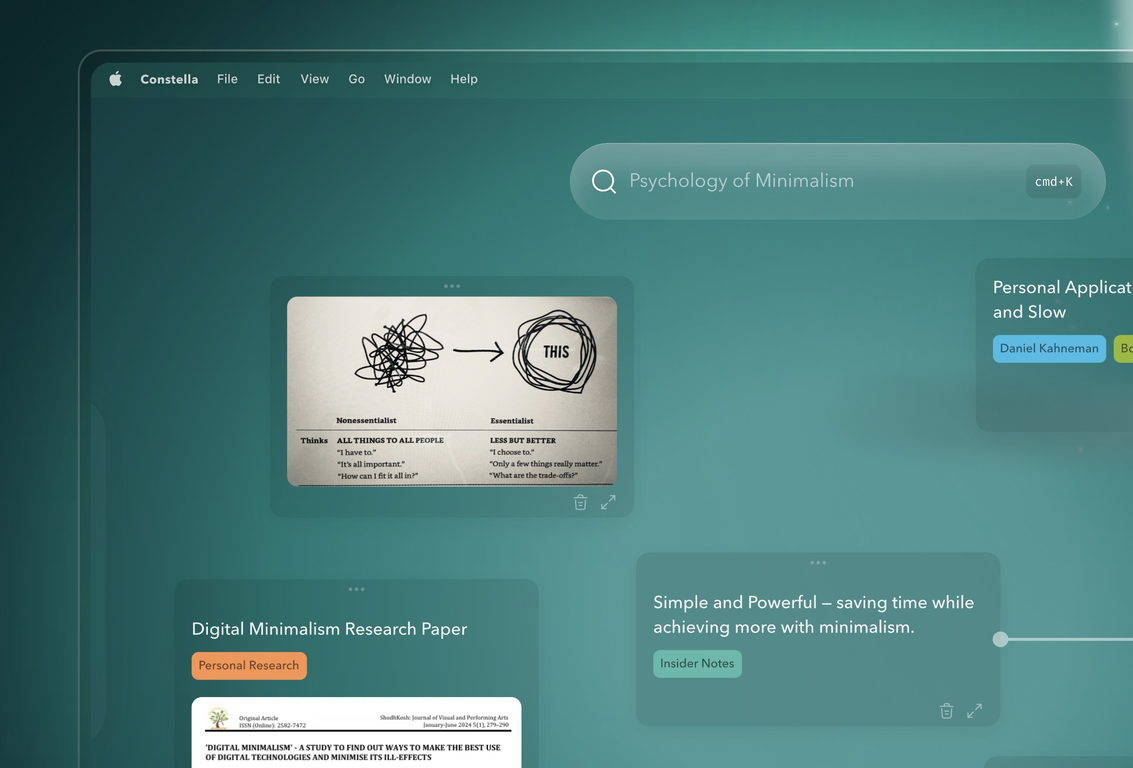
Constella is the next leap forward in Second Brain.Instantly capture thoughts and see related notes as you type. Save time by just pressing Enter instead of hunting through files and folders.Recall all your notes and files in the future with AI search. Get everything you need, when you need it.Think on another level with advanced features as you read documents and connect your ideas.Instead of having to use ChatGPT separately, get personalized responses from Stella, the built-in AI assistant.Using your connected thoughts, she is much smarter than bland AI assistants and can give you the relevant advice you need with 'Deep Think' mode.Constella is an intelligent canvas or 'Second Brain' app designed to help users build knowledge and streamline the organization of notes, links, and files. Operating as a visual infinite graph, it strives to eliminate the need to search through traditional files and folders by presenting related notes as the user types. The apps core functionality is powered by artificial intelligence, moving beyond the extension idea to place it squarely at the core. Users can effortlessly add notes or files, which are instantly stored by Constella, thereby allowing users to focus on thinking and creating. A key feature of the platform is its ability to surface relevant notes from the past on its canvas while the user is typing, thereby aiding recall. The app supports connections between thoughts in a visual and intuitive way that mirrors the functionality of neurons, and it also allows for easy import and export of content from other apps for full ownership of the user's second brain. Further capabilities include quick searching, built-in importing and exporting, and mobile on-the-go features. Beyond just being an organizational tool, Constella can be used for a variety of use-cases including as a Personal Knowledge Management system (PKMS), assisting in research, aiding in decision-making, facilitating mind mapping, and generating knowledge based on the Zettlekasten system used by Niklas Luhmann. Flat data privacy and secure cloud sync features promote user security.
Pros and Cons
Pros
- Visual infinite graph
- No-search note retrieval
- Real-time note surfacing
- Facilitates neurologically-informed thoughts mapping
- Content import/export capability
- Efficient searching feature
Cons
- Limited customizability
- No multi-users/shared canvas capability
- Weak offline support
- No folder-based organization
- Inflexible exporting formats
- Inefficient when overloaded with notes
Categories
- Primary: Work
- Secondary: Productivity
- Specialty: Knowledge
Community Feedback
Only the latest comments are shown.Love this!! 100x better than Notion, this should get more attention